
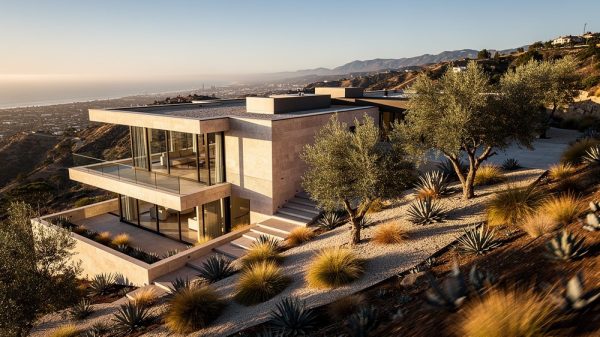
Thorpe Studios produces architectural fly-through animation in San Diego for architects, custom home builders, and developers who need to show a project before construction begins. As a licensed California architect, I work directly from your AutoCAD, SketchUp, or Revit files — the same source documents your contractor reads — which means the geometry is accurate and the materials match your specifications, not an asset library approximation.
A fly-through animation is a moving camera path through a fully rendered 3D model. Where a still rendering captures one moment from one angle, a fly-through gives the complete spatial experience: the site approach, the entry sequence, the interior flow, and the views your clients will live with every day. For client presentations, investor pitches, and permit board submissions, that difference in understanding changes how fast decisions get made.
Why Fly-Through Animation Changes How Clients Respond
Most clients can’t interpret plans. That’s not a criticism — reading 2D construction documents accurately requires training most people don’t have. A static exterior rendering improves comprehension, but it’s still one frozen moment from one vantage point. Clients are left to imagine what the space actually feels like to move through.
Fly-through animation removes that gap entirely. A 2023 study by the National Association of Realtors found that listings with video content receive 403% more inquiries than those without — and the same dynamic applies in architectural presentations. When clients can see themselves moving through their unbuilt home, they approve faster, request fewer revisions, and enter construction with more confidence. My fly-through animation service is designed specifically for the San Diego and Southern California residential market, with camera paths planned around each project’s actual design intent — not a generic walkthrough template.
What Every Fly-Through at Thorpe Studios Includes
Every project starts with your source files. I work from AutoCAD (.dwg), Revit (.rvt), SketchUp (.skp), and 2D plan sets in PDF format. Nothing is rebuilt from a scan or approximated from stock geometry. The 3D model I construct in Blender reflects your actual dimensions, roof geometry, ceiling heights, and material specifications — the same data your contractor works from.
Before rendering begins, I plan the camera path: how the viewer approaches the site, where they pause, what draws their eye at each beat of the sequence. The camera moves the way a real person would move through that specific building. Final delivery is broadcast-quality MP4, typically at 1080p or 4K, and includes at least two lighting conditions — a daytime exterior pass and an evening version with the building lit from within, which performs differently in presentations versus marketing content.
Ready to Put Your Project in Motion?
If you have a design that needs to move from drawings to something your clients can actually experience, I can help. Get a quote and let’s talk through your timeline and deliverables.
Who Benefits Most from Fly-Through Animation
Independent architects and small firms in San Diego are the most common clients for this service — presenting a custom residential design to an owner who hasn’t been through the process before and needs more than a floor plan to commit. Luxury custom home builders use fly-throughs as pre-construction marketing assets: website video, social content, and broker presentations before a slab is poured. Real estate developers use them for investor decks and pre-sales to buyers who can’t read spatial relationships from drawings alone. Interior designers use shorter sequences to show renovation concepts when a client is weighing a major structural change. For clients who want to go beyond video and step inside the unbuilt space themselves, VR architectural presentations using Meta Quest headsets take that a step further.
Fly-Throughs for Investor Decks and Permit Submissions
A well-produced 90-second fly-through — site approach, exterior reveal, interior sequence — communicates the investment case faster than any written pitch deck. Investors who can see a project respond differently than investors reading about square footage and finish levels. In my experience working with San Diego and Orange County developers, adding an animated fly-through to a capital raise deck has a measurable effect on how seriously the project gets taken at the first meeting.
On the permitting side, a photorealistic exterior rendering handles most planning board requirements, but a fly-through is more persuasive when massing, setbacks, or the project’s relationship to neighboring structures need to be shown in sequence. Several California jurisdictions now expect this level of visual documentation for significant residential projects. Getting ahead of that requirement saves revision rounds later.
How Fly-Throughs Fit a Broader Visualization Package
Most projects need more than one deliverable. A fly-through drives the opening presentation; still renderings work for printed leave-behinds and permit boards; a fully constructed 3D model from your 2D drawings gives your contractor a coordination reference and your estimator a takeoff base. I produce all of these from the same source geometry, which keeps materials and dimensions consistent and cuts total turnaround compared to commissioning each piece separately.
For projects requiring real technical depth, I also produce Building Information Models (BIM) with automated material lists and quantity takeoffs — working deliverables your project manager can use directly, not just visualization assets. Read more about how BIM services add value to complex residential projects and where they fit alongside a fly-through package.
Why a Licensed Architect Produces Better Fly-Throughs
Rendering studios staffed by 3D generalists produce technically capable animation. But there’s a consistent gap in how the space gets read. Camera paths that don’t honor the architectural hierarchy of a building. Lighting that looks good on screen but misrepresents how a room actually performs given its orientation. Materials chosen for visual appeal rather than specification accuracy. These details add up to animations that feel slightly off without the client knowing exactly why.
Because I’m a licensed California architect, I approach every fly-through the way I’d approach a design review. The camera moves where a real person would move through that specific building. The light hits the south-facing glazing at the correct angle for San Diego’s latitude and season. The materials are what’s in the specification, not what looked interesting in a library. Visit the About page for more on the background and training behind every project I take on.
Frequently Asked Questions
How long does a fly-through animation take to produce?
A standard residential fly-through — 60 to 120 seconds, exterior and interior sequences — typically takes 5 to 10 business days from file delivery, depending on project complexity and revision rounds. Expedited delivery is available for tight presentation deadlines; contact me to discuss your timeline and I’ll give you an honest answer on what’s achievable.
What file formats do you work from?
I work directly from AutoCAD (.dwg), Revit (.rvt), SketchUp (.skp), and 2D plan sets in PDF format. If you’re working from 2D drawings that need to become a 3D model before the animation can begin, that’s part of the process I also handle — see the 3D modeling service page for details on file requirements and turnaround.
What’s the difference between a fly-through and a VR walkthrough?
A fly-through is a pre-rendered video: the camera follows a fixed path and the client watches. A VR walkthrough is interactive: the client puts on a Meta Quest headset and navigates the space at full scale on their own. Fly-throughs work better for large group presentations, investor meetings, and marketing content. VR is most effective for one-on-one client meetings where you need maximum impact before a major design decision.
Do you serve clients outside San Diego?
Yes. Thorpe Studios works with architects and developers throughout Southern California — Orange County, Irvine, Newport Coast, Los Angeles, and the Inland Empire. Fly-through animation is delivered remotely: you send the files, I deliver the MP4. For in-person VR presentations, I’m available in San Diego and Orange County. See the service areas page for the full coverage area.
Ready to Get Started?
If you have a residential or commercial project that needs to move from drawings to something clients can experience, let’s talk. A fly-through from Thorpe Studios is built from your actual files — not approximated — by an architect who knows how to read them.
Get a Quote or call us at (123) 456-7890.